Travel usually gives you only one chance to record each moment. A bus pulls away, a friend laughs, a street performer finishes a song, and that exact scene never returns. Your phone is the camera that is always with you. With a bit of intention and a few simple habits, those quick clips can look calm, clear, and worth watching again.
Plan your travel story before you press record
Before you start filming every building and every meal, pause for a short moment and ask what you want to remember. Is it the feeling of a whole city, one day on the road, or a single special activity. When you decide this early, every shot has a reason and your future editing becomes much simpler.
Choose a basic path for your story. You might follow your own day from breakfast to evening walk, or focus only on food, markets, and small street details. When you plan like this, you can decide where a steady walking shot helps, where a static scene is better, and where a smooth move with a gimbal later will add something extra.
Questions to ask before filming
- What feeling do I want this clip to have, such as calm, busy, or playful, and how can my movement support that mood.
- Who is this video really for, myself in ten years, close friends and family, or people I have never met online.
- Which three locations today will matter most to me later, so I know where to spend more time recording and when it is worth setting up extra support.
Choose the right light on the road
Light changes from hour to hour when you travel, and your phone reacts to that change very quickly. Early morning and late afternoon usually give softer light and longer shadows, which make streets and faces easier to film. When the sun sits high and bright, move into shade or turn your subject slightly so they are not staring directly into the light.
Watch the sky while you walk. If clouds move fast, brightness may jump from dark to bright in one second, which can cause your exposure to pump up and down. When you notice this, wait a moment for the light to settle or record a second take. Good light will do more for your travel videos than any filter, so give it attention before you hit record.
Keep your phone stable while moving
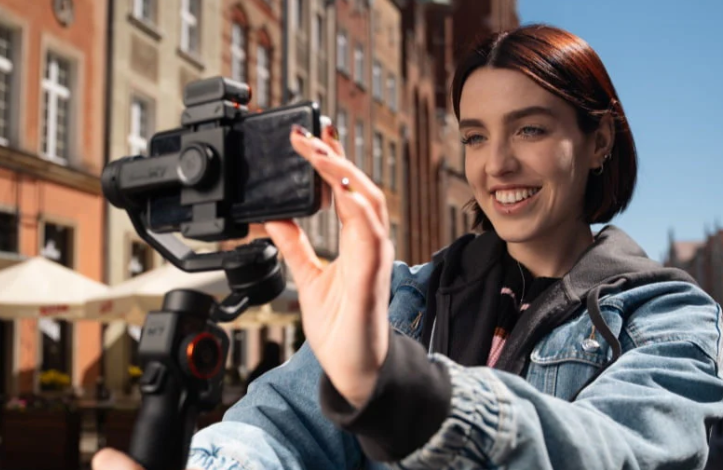
Shaky footage is one of the biggest reasons travel videos feel worse than your memory of the moment. A Smartphone-Gimbal can turn rough steps into smoother motion, but your own body still plays a huge role. Bend your knees slightly, keep your core tight, and walk with short, soft steps so each frame carries less impact from your feet.
Hold your phone with both hands and keep your elbows close to your body. Imagine you are carrying a small bowl of water that you do not want to spill. The more you reduce sudden twists from your wrists and shoulders, the less work your phone and Smartphone-Gimbal have to do. Move your whole upper body when you turn instead of snapping the camera quickly to one side.
Practice simple paths in quieter corners, like walking along a wall or railing and keeping it near the same place in your frame. This helps you see how much your natural steps change the image. Later, when you walk through busy streets with a Smartphone-Gimbal, that smoother style will already feel normal, and the stabilizer will only refine what you already do well.
Practice moves before your trip
- Walk ten steps forward while filming a friend, then review the clip and note how much the horizon line moves from side to side.
- Repeat the same move with slower, shorter steps, and again with a Smartphone-Gimbal, and compare which version feels most comfortable to watch back.
- Try a gentle side step while tracking someone, then decide if the movement adds to the scene or distracts from it, and write down which Smartphone-Gimbal move you prefer.
See also: Optimus Fleets LLC – Luxury Chauffeur & Black Car Service in National Park, New Jersey
Add extra support when your hands are not enough
Some situations are simply too demanding for careful steps alone. Narrow alleys, busy markets, and moving vehicles add bump after bump to your frame. In these moments a Smartphone-Gimbal gives you a better chance of keeping faces clear and lines straight. You can hold the handle low for a street level feeling or lift it slightly for a cleaner view above heads.
Think about how long you will be recording. Holding your arms up for several minutes grows tiring and leads to more shake at the end of a clip. A balanced Smartphone-Gimbal reduces the strain in your wrists and shoulders, so your last seconds of a walking shot stay as steady as the first few. This is especially helpful when you follow someone across a square or through a station.
Try different operating modes to match your style. Some Smartphone-Gimbal modes follow horizontal turns, which helps keep the horizon flat while you walk. Others let you lock a direction or create slower, smoother pans that are easier for viewers to follow. Once you understand how your Smartphone-Gimbal responds, you can decide in advance whether a scene needs a floating feeling or a more simple, documentary look.
Frame people and places with simple composition rules
Even with stable footage, a confusing frame makes travel videos hard to enjoy. Use basic composition ideas like the rule of thirds and clear foreground and background. Place your main subject slightly to one side instead of right in the center, and leave space in front of the direction they are walking. A Smartphone-Gimbal helps you keep that framing steady while you move.
Look for elements that can guide the eye, such as lines from roads, fences, or building edges. When these lines lead toward your subject, the viewer understands the focus almost at once. If you are using a Smartphone-Gimbal, you can gently slide along those lines so they move smoothly from one corner of the frame to another, instead of jumping in sudden steps.
Easy framing ideas
- Start with a wide shot that shows the whole street or square, then walk closer for a medium shot of your subject, keeping your Smartphone-Gimbal level and the horizon straight.
- Use doorways, arches, or windows as frames inside the frame, letting your subject pass through them while you move at a steady speed.
- When you arrive at a landmark, hold one steady shot first, then add one simple walking shot that reveals a new detail or a new angle.
Record clear sound in busy places
Many travelers focus only on the image and forget that sound carries half the feeling of a moment. Street music, conversations, and traffic often mix into a single wall of noise. Whenever you can, step a little closer to your subject so their voice is stronger than the background. Even when a Smartphone-Gimbal keeps your motion smooth, it is better to move your feet than to rely on digital zoom.
Pay attention to wind and echo. Strong wind can hit your phone microphones directly and cause rumbling noise. If you feel a gust, turn your body so you block some of it, or move near a wall or doorway for shelter. In very noisy places, record more visuals and fewer long talking clips, then later add music or short voice notes over the most important scenes.
Edit and review your clips after each day
At the end of each travel day, take a few minutes in your room or a quiet café to look through your footage. Delete clips that are clearly unusable, such as those where your Smartphone-Gimbal did not level correctly or the focus never locked. This saves storage space and keeps your future editing session from feeling heavy and slow.
While you review, notice which shots you like most. Maybe your favorite moments are calm, steady scenes where almost nothing shakes, or maybe you prefer short dynamic walks that follow a friend across a square. Use these notes to guide how you shoot tomorrow. Over several days, you will learn which Smartphone-Gimbal moves and simple handheld habits give you travel videos that match how the trip really felt.